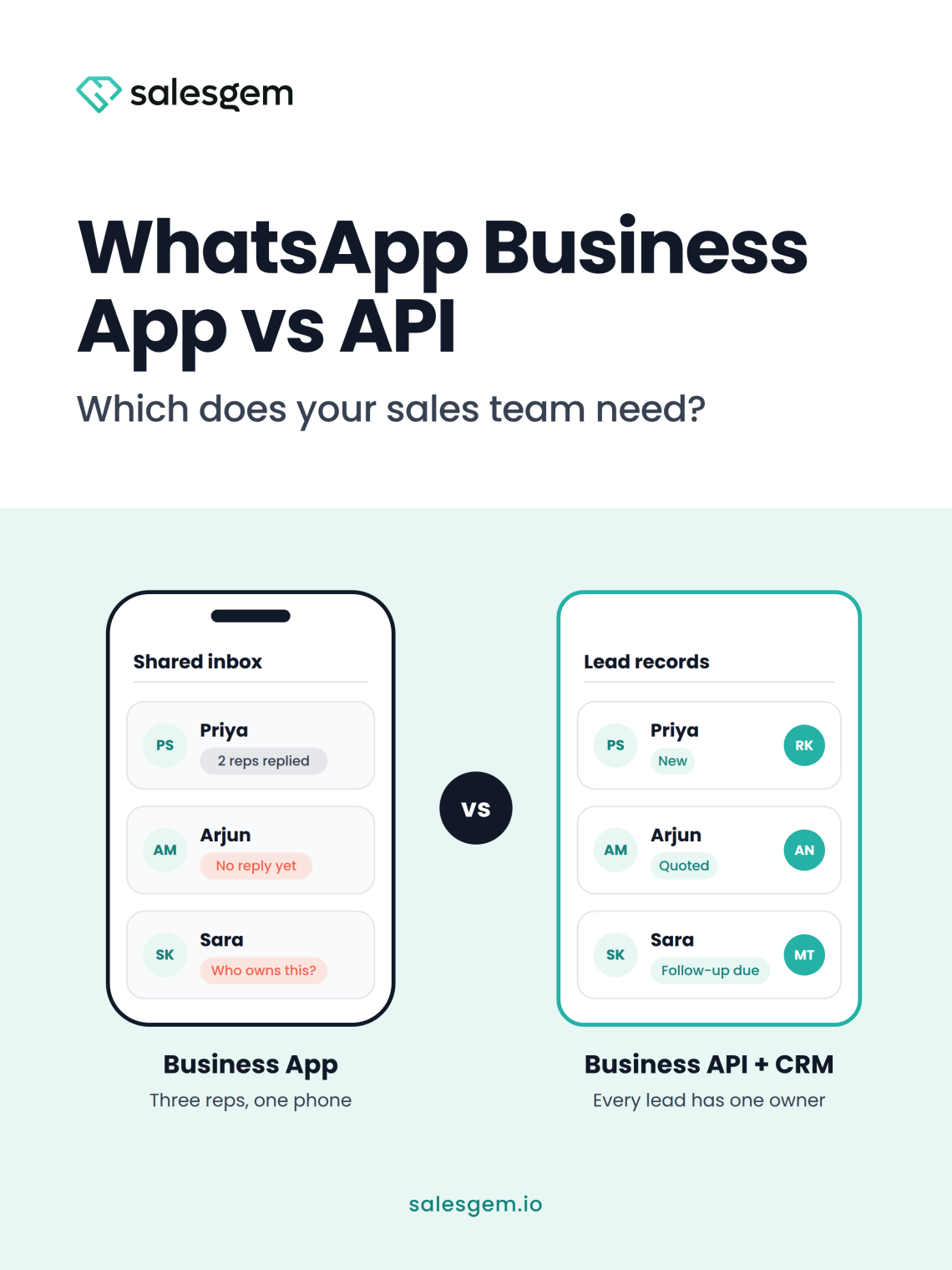
If one or two people handle your WhatsApp leads, the free WhatsApp Business App usually does the job. Once three or more reps share ad leads, you need the WhatsApp Business API and a CRM. I learned the WhatsApp Business App vs API difference the slow way, by reviewing leads my team had already lost.
I’ve worked with sales teams for more than 10 years. My clients include aesthetic clinics, coaching businesses, solar installers, home service companies and car dealerships. Nearly all of them follow up on leads through WhatsApp. Very few check whether their setup can support a team, or whether they need a CRM with WhatsApp integration. I didn’t check either, at first.
I thought our WhatsApp setup was working
For a long time, I believed our WhatsApp setup was fine. Every rep had access to the same WhatsApp Business number. Leads were getting messages, and nobody complained.
Then I started reviewing lost leads.
A Facebook lead would come in, and someone would message them on WhatsApp. After that, the conversation would just sit there. Sometimes another rep replied because they thought the first person had missed it. Other times, nobody followed up, because everyone assumed someone else was handling it.
When a lead disappeared, I couldn’t explain why. The rep might have missed a reply. The lead might have stopped responding. Or nobody had followed up at all. I had no way to find out.
The problem wasn’t WhatsApp. WhatsApp designed the Business App for one owner talking to customers, and I was using it to run a sales team.
There was no real ownership of a conversation. I had no clean way to see which rep had responded. I also had no manager view showing which leads were waiting for a reply.
Where the WhatsApp Business App stops working for a team
The App does its original job well. A solo coach or a shop owner can run customer chats from one phone at no cost. It also gives you a business profile, labels and quick replies.
The trouble starts when a sales team shares it:
- You get one number on one primary phone, plus up to four linked devices. Everyone sees the same inbox, so no rep owns a chat.
- You can’t assign a new lead to a specific rep. You also can’t see response times or which rep replied.
- There’s no official CRM connection. Conversations live on devices instead of on the lead record.
- Linked devices depend on the main phone. If it stays offline for 14 days, every linked device logs out.
- A broadcast list holds 256 contacts. Messages only arrive if the person saved your number, and new ad leads usually haven’t.
Follow-up has one more catch. WhatsApp has been testing monthly limits on messages sent to people who don’t reply. A rep sending four nudges to a silent lead fits the pattern those limits target.
When the shared phone gets crowded, reps start using their own numbers. I’ve written about where that ends up in why your sales rep’s phone shouldn’t be your CRM.
What changed when we moved from the WhatsApp Business App to the API
Moving to the WhatsApp Business API through our CRM fixed ownership first.
The CRM assigned each new lead to a specific rep automatically. The conversation stayed attached to the lead record instead of living on someone’s phone. I could see who had replied, what stage each lead was in and which conversations were going cold.
More importantly, automation handled the parts reps were bad at remembering. A new lead received an approved WhatsApp template right away. The assigned rep then took over the conversation. When the lead went quiet, the CRM created a follow-up task.
That first template matters for a technical reason. Someone who fills in a Facebook lead form has never messaged you. So on the API, your first message to them has to be a template Meta has approved. That’s why it helps when your Facebook lead ads flow straight into your CRM.
As a manager, that changed what I measured. I stopped asking, “Did someone message this lead?” Instead, I asked, “Who owns this lead, how quickly did they respond, and what happened next?”
That is the difference between using WhatsApp as a messaging app and using the WhatsApp API as part of a sales process.
The follow-up rule that caught my reps out
The second problem showed up after the move, when I started taking follow-up seriously.
My reps did what I asked. They followed up with leads who hadn’t booked. After the first conversation, though, WhatsApp’s own rules became part of the problem.
A lead could ask for a quote on Monday and disappear for two days. By Thursday, they needed another message. But reps couldn’t treat WhatsApp like a personal chat and message whenever they liked.
Here’s the rule on the API. When a customer messages you, a 24-hour customer service window opens. Inside it, reps can send normal messages. Once it closes, the next business message must use an approved template.
That created another failure point. Reps remembered to follow up, but not which message they were allowed to send. Some switched to personal numbers. Others waited for the lead to reply first. By then, the sales conversation had gone cold.
The CRM gave us a more controlled process. When a follow-up was due, it triggered an approved template. The conversation and lead history stayed in the same record. When the lead replied, the window reopened, and the rep carried on inside the CRM instead of on a personal phone.
Follow-up stopped depending on a rep remembering what to do next. For a sales manager, that’s the real value of the API. It turns WhatsApp from a shared inbox into a controlled part of the sales workflow.
What the WhatsApp Business API costs compared with the App
Before the API, WhatsApp felt free because reps were just typing messages. After the move, I had to think about templates, message categories, conversation windows and usage. That extra thinking helped. It forced us to treat every follow-up as part of a measurable sales channel.
Here is how pricing works, according to Meta’s WhatsApp pricing documentation:
- The WhatsApp Business App is free, and Meta’s API pricing changes don’t touch it.
- On the API, Meta charges per delivered message. Your BSP or CRM may add its own fees on top.
- Meta’s rate depends on the template category and the country of the person receiving the message.
- Templates fall into marketing, utility and authentication categories. Marketing is usually the most expensive.
- Chats that start from a click-to-WhatsApp ad or a Facebook Page button get a free 72-hour window when you reply within 24 hours.
The October 2026 change sales managers should plan for
Replies inside the 24-hour window were free until October 1, 2026. From that date, Meta charges for them after the first 1,000 each month, per business phone number. Utility templates sent inside the window are also chargeable from that date.
For a sales team, this turns rep habits into a cost line. Past the free allowance, five short replies cost five times what one clear message costs. So I now coach reps to send one complete message instead of a string of fragments.
Meta can update rates at the start of each quarter, so check the current rate card before you budget. If you sell to US customers, note that Meta paused marketing templates to US numbers in April 2025. The pause was still in place in mid-2026, although utility templates and replies still go through.
Setting up the API through a BSP or CRM
The API doesn’t come as an app you download. You reach it through a Business Solution Provider, usually called a BSP, or through a CRM with an official integration.
Here is what setup usually involves:
- Create or use a Meta Business portfolio for your company.
- Choose a phone number for the API.
- Complete business verification and get your display name approved.
- Write templates and submit them for Meta’s review.
- Set up billing for message charges, directly with Meta or through your provider.
Expect some friction. Meta can reject or recategorize a template that sounds promotional. New accounts that aren’t verified can also open conversations with only a limited number of people each day. That limit grows as you verify and keep message quality high.
If your team has years of chats on an App number, look at Meta’s Coexistence option. It connects your existing App number to the API, so you keep the phone app and add automation. You need to keep the App installed and open it regularly. Your display name might not show to new contacts unless you pay for Meta Verified.
When you compare providers, look beyond the message price. Check whether the conversation lands on the lead record, whether leads get assigned to reps, and whether a manager can see what happened. Those checks separate a messaging tool from a WhatsApp CRM for sales teams.
WhatsApp Business App vs API: the decision table
Here’s the quick comparison I share with sales teams.
| WhatsApp Business App | WhatsApp Business API | |
|---|---|---|
| Cost | Free | Meta charges per message, plus provider fees |
| Team access | One primary phone and up to four linked devices | Many reps, depending on your CRM or provider |
| Lead ownership | Shared inbox with no assignment | Each lead assigned to a rep |
| CRM connection | No official integration | Connects through a CRM or BSP |
| Messaging rules | Message anytime, within spam limits | Templates needed outside the 24-hour window |
| Manager view | None | Depends on your CRM |
| Setup | Download and start | Verification, templates and billing |
And here’s how I help teams decide.
| Your situation | Start with | Why |
|---|---|---|
| Solo owner answering mostly inbound chats | App | Free, simple, and you already own every chat |
| Two people sharing one phone who talk daily | App | You can still coordinate by talking to each other |
| Three or more reps working Facebook or Instagram lead ads | API with a CRM | You need assignment, ownership and a manager view |
| Sales cycle runs days or weeks after a quote | API with a CRM | Follow-ups outside the window need scheduled templates |
| Years of chat history on your App number | Coexistence | Keep the App and add the API on the same number |
| Mainly sending bulk promotions to large lists | A broadcast tool on the API | Campaign tools handle bulk sends better than a sales CRM |
WhatsApp Business App vs API by industry
The same decision looks different depending on what you sell. Here’s what I see most often.
Aesthetic and healthcare clinics
Clinics running Meta ads get steady enquiries about high-value procedures. A patient asks about a hair transplant, gets a price and then thinks about it for a week. That silence closes the 24-hour window on almost every warm lead.
On the App, the coordinator’s phone becomes the patient file. Patients send photos of their concern, and those photos sit on a device the clinic doesn’t manage. On the API, keep templates about appointments and next steps. Meta will likely treat a consultation discount message as marketing, which usually costs more.
Education and coaching
Admissions counsellors change jobs often. On the App, a counsellor’s chats leave when they do. Enquiries also spike around each intake. That’s exactly when the 256 contact broadcast limit and the saved-number rule stop you reaching new leads.
Many enquiries come from students, while a parent makes the final call. A CRM lets you keep both contacts on one lead, so nobody messages the wrong person.
Solar installers
Solar has the longest sales cycle I work with. A lead moves from enquiry to site survey, quote and financing. Often a telecaller, a surveyor and a closer each touch the same lead.
On the App, roof photos and electricity bills end up spread across three phones. On the API, most follow-ups fall outside the 24-hour window. Scheduled templates tied to each stage matter more in solar than anywhere else I’ve worked.
Car dealerships
Dealerships usually have several consultants on one floor. Buyers also talk to more than one dealer at a time, so slow first replies lose deals. When a consultant joins a rival dealer, their WhatsApp contacts often go too.
Price negotiation happens in chat as well. A sales manager needs to see which discounts were offered. You can’t do that when the chat lives on a personal phone.
Choosing between the WhatsApp Business App and API: my advice
After making this move and talking it through with other sales leaders, here’s what I’d tell any sales manager.
- Review ten lost leads before you decide. If you can’t tell who owned each one, your team has outgrown the App.
- Write your follow-up templates before you need them. Start with one for after a quote and one for a missed appointment.
- Keep utility templates about the lead’s actual request. Meta will likely categorize anything with an offer as marketing.
- Coach reps to send one complete message instead of several short ones. It reads better, and it costs less after October 1, 2026.
- Stop reps from moving leads to personal numbers. If they want to, your process is too hard to follow, so fix the process.
- Measure ownership and response time. Ask who owns each lead, how quickly they responded and what happened next.
If your team runs Facebook and Instagram lead ads and follows up on WhatsApp, Salesgem is built for that job. It captures leads from your ads, assigns them to reps and connects to WhatsApp through the official WhatsApp Business API. Sign Up and try it with your own leads.
No credit card needed · 14 day free trial · Free support and migration
Frequently asked questions
The difference between the WhatsApp Business App and API is who each one serves. The App is a free phone app for one owner, with up to four linked devices. The API has no app of its own. You connect it to a CRM or provider, so many reps can work leads with assignment and templates. Meta charges per message on the API.
Multiple sales reps can use one WhatsApp Business number, with limits. On the App, one primary phone can link up to four more devices. Nobody owns a chat, though, and there’s no lead assignment. On the API, a CRM can give each rep their own login. It can also assign leads to specific people on the same number.
The WhatsApp Business API isn’t free. Meta charges per delivered message, based on the message category and the recipient’s country. Your provider may add fees too. From October 1, 2026, replies inside the 24-hour window cost money after the first 1,000 each month per phone number. Chats from click-to-WhatsApp ads still get a free 72-hour window when you reply in time.
You usually need a BSP or a CRM with an official integration to use the WhatsApp Business API. The API has no inbox you can download. A provider handles the connection, templates and billing setup. A CRM then adds lead assignment and follow-up tasks on top. Some developers connect directly, but most sales teams don’t.
You can use the WhatsApp Business App and API on the same number through Meta’s Coexistence option. It connects an existing App number to the API. You keep chatting from the phone while a CRM handles automation. You need to keep the App installed and open it regularly. Your display name might not show to new contacts without Meta Verified.
When the 24-hour WhatsApp window closes, a business on the API can only send an approved template. The window opens each time a customer messages you. Inside it, reps can send normal replies. After it closes, a template restarts contact, and the window reopens once the lead replies. The WhatsApp Business App doesn’t have this rule.