I have spent more than ten years as a sales consultant, and the best CRM with Facebook Conversions API support is the one that sends real sales outcomes back to Meta, matched to the exact lead, while the rep is still working it. Few CRMs do this natively. Most leave it to a connector that somebody has to build and repair. I learned the difference by watching two pipelines go wrong in two different ways.
I have worked with sales teams in several industries, and I am constantly talking to other sales experts. The same complaint keeps coming up: the leads from Facebook are getting worse. Cost per lead says everything is fine. The reps say otherwise. Almost nobody has the data to settle it.
If you want the technical overview first, the page on a CRM with Facebook Conversions API covers the setup. This post covers what that setup looks like from the sales floor.
The problem showed up in the pipeline, not in Ads Manager
I first saw this problem in a sales pipeline, long before it appeared in Ads Manager. A client who sold consultations had Facebook campaigns producing plenty of leads. The cost per lead looked healthy. The reps kept telling me the quality was getting worse.
Marketing disagreed, and the numbers backed them up. Both sides had a point, and neither could prove it. Facebook knew a form had been submitted. It knew nothing about what happened on the next phone call.
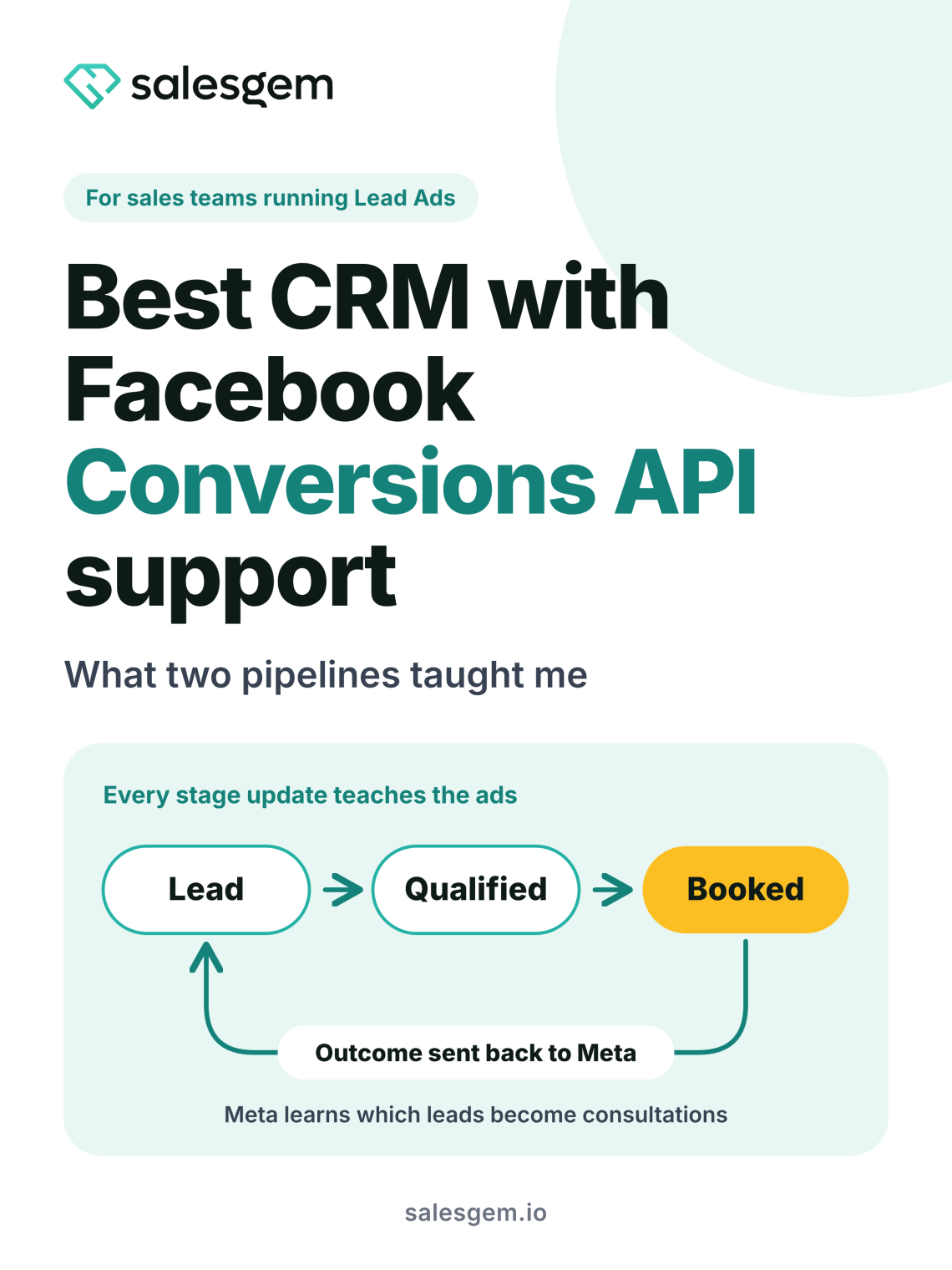
So I connected the CRM stages to the conversion feedback loop. We stopped treating every form submission as a success. Instead, we sent outcomes such as qualified and booked back to Meta. The conversation changed quickly. We could see which campaigns produced consultations rather than contacts, and the team followed up from the same system where the lead was captured.
The biggest improvement wasn’t another dashboard. It was one reliable record from Facebook enquiry to sales outcome.
Why few CRMs handle the Conversions API well
Most CRMs capture a Facebook lead and stop there. Sending that lead’s progress back to Meta usually takes a connector or a webhook that somebody builds, tests and repairs when something changes.
Something changes often. Meta retired its legacy Offline Conversions API on 14 May 2025, according to LeadTrackr’s guide, and CRM events now travel through the Conversions API instead. An older integration can keep looking connected while Events Manager receives nothing. Nobody on the sales floor notices until someone asks why the campaign stopped improving.
The buyers who ask about this are rarely beginners. They already run Lead Ads, they already watch cost per lead, and they want to know what happens after the lead arrives. A CRM that treats the Conversions API as a checkbox loses them in the first demo.
Why Conversion Leads optimization is the reason to care
Meta’s Conversion Leads optimization is the reason this matters. Meta normally learns from form submissions, so it finds more people who submit forms. With Conversion Leads, your CRM sends lead stage updates through the Conversions API, matched by Meta’s lead ID, so the ad system learns which leads mattered. Meta’s CRM integration guide describes the payload.
That guide tells you to send every lead stage as it updates, starting with the raw lead event for every lead generated on Meta. It also says a lead ID you send must be valid, or the system rejects the event. That single rule decides which CRM with Facebook Conversions API support actually works.
A rep who marks a lead as booked is training the ad system. A rep who forgets to update the lead is training it on silence.
The setup that looked fine and was not
My second lesson came from a setup that looked right on paper. Leads arrived from Facebook. Reps followed up by phone, WhatsApp and sometimes both. Someone updated the stages later, in batches. The Conversions API was live, and the results still swung from one week to the next.
The cause was simple once I looked closely. The data going back to Meta described what someone remembered at the end of the week. A lead called on Tuesday showed as qualified on Friday. A lead who never picked up sat in the wrong stage for days.
I moved the process into a CRM where lead ownership, follow ups, pipeline stages and conversion events sat together. Reps updated the lead as they worked it. Nobody rebuilt the story afterwards from spreadsheets and WhatsApp chats. Keeping lead records on a rep’s personal phone makes that rebuild almost certain.
Once the sales data became cleaner and timelier, the Conversions API turned into more than tracking. It closed the loop between the ads generating leads and the sales team turning those leads into revenue. Fast follow up helped twice. The rep reached the lead sooner, and Meta received a fresher signal. The page on lead follow up for small business teams goes deeper on the first half.
How a CRM with Facebook Conversions API matches leads
Meta can match an event to a person in two ways. The first uses customer details such as a hashed email address and phone number. It works when the details are clean, and it loses accuracy when a lead mistypes a phone number or uses a different email address on the form than the one tied to their Facebook account. The second uses the lead ID that Meta attaches to every Lead Ad submission, known as the leadgen_id. An exact ID leaves nothing to guess.
A CRM that stores the raw leadgen_id the moment the lead arrives can send it back with every stage change. That ties each outcome to the exact submission that produced it. A CRM that drops the ID at capture falls back on contact details and hopes they match.
I now ask one question first in every demo. Where does the lead ID live, and does it travel with every update? A vague answer tells you most of what you need to know.
What this looks like in different industries
Clinics and aesthetic practices need the most care. Meta tightened its data rules for health advertisers from January 2025, according to Matchnode’s healthcare guide, and a 2026 compliance guide warns that event names and form fields hinting at a condition can get flagged. I tell clinic owners to use neutral stage names such as qualified and booked, keep condition questions off the form, and check the current rules with a compliance adviser before sending anything. The CRM still earns its place, because it holds the real outcomes even when Meta limits what it will optimise for.
Education and coaching teams wait longer for a result. A lead books a counselling call, joins a demo class, then pays days or weeks later. Sending counselling call booked as its own stage gives Meta a signal in days instead of waiting for the payment.
Solar sales cycles run longer still, from site visit to quote to finance to installation. Offline events can reach Meta up to 62 days after the conversion, according to LeadTrackr, and a solar sale can land after that. Stages such as site visit booked and quote sent keep the signal flowing.
Car dealerships and home service businesses lose the trail on the phone. A buyer enquires on Facebook, rings the showroom, then walks in. If the CRM captured a clean phone number and the lead ID at the start, the walk in can still match back to the ad.
My advice before you choose a CRM
Ask five questions in every demo before you sign anything.
- Does the CRM store the Facebook lead ID the moment the lead arrives?
- Does it send stage changes as reps make them, or in a nightly batch?
- Can a rep change a stage from their phone in a few seconds?
- Can you choose which stages go back to Meta, and rename them?
- Does it show which campaign produced consultations as well as contacts?
Salesgem answers those questions this way. It captures Facebook and Instagram Lead Ads, keeps the raw leadgen id on every lead and sends stage changes back to Meta through its Conversions API module. Because the match runs on the ID itself, every lead that came through a Lead Ad matches at 100 percent. Reps follow up by phone and WhatsApp from the same record, so the stage they set is the stage Meta hears about.
If your reps keep saying the leads got worse while cost per lead looks fine, fix the feedback loop before you change the creative. The cleanest place to start is a CRM with Facebook Conversions API support built into the lead record.
No credit card needed · 14 day free trial · Free support and migration
Questions people ask about a CRM with Facebook Conversions AP
A CRM with Facebook Conversions API support sends lead stage changes, such as qualified or booked, to Meta’s servers. Meta then learns which leads became real outcomes and shows your ads to similar people. The CRM must store the lead ID at capture and send updates as reps work the lead.
A CRM can match on hashed email and phone number without the leadgen_id, but storing the ID is the better route for Conversion Leads optimization. Meta’s documentation recommends sending the lead ID and rejects events that carry an invalid one. An exact ID removes guesswork.
Send the stages that show buying intent, starting with the raw lead, then qualified and booked. Add later stages such as won if your sales cycle produces enough of them. Long cycles, such as solar, favour earlier stages like quote sent. Pick stages your reps update reliably.
Clinics can use the Conversions API, but Meta has tightened its rules for health advertisers since January 2025. Use neutral stage names, keep condition questions off lead forms and send no clinical details. Check the current rules with your compliance adviser, because some lead events may be limited.
Cost per lead counts form submissions, so it cannot show lead quality falling. If Meta never hears which leads became consultations or sales, it keeps finding people who fill in forms. Sending qualified and booked stages back gives the ad system a quality signal to learn from.