WhatsApp follow up gets annoying when the lead can’t place you or can’t see why you’re still writing. The number of messages matters less than most sales managers think. Good follow up opens with context the lead recognizes and asks how they want to continue. It also stops at a point you chose before the first message. I learned that the hard way, on two leads I still think about.
For more than ten years I’ve worked as an external sales consultant. My clients have included aesthetic clinics, coaching institutes, solar installers, home service companies and car dealerships. Most of their lead conversations now happen on WhatsApp. That’s especially true for businesses selling in India, the Gulf and Southeast Asia, where WhatsApp is often the main sales channel. Some of these teams run leads through a CRM with WhatsApp integration. Plenty still work from a shared sheet and a rep’s personal phone. The first time I saw the problem clearly, I was the rep causing it.
The lead who read my WhatsApp follow up and went quiet
A Facebook lead had asked for pricing. I called her once, and when she didn’t pick up, I sent a WhatsApp message.
She saw it but didn’t reply.
My first reaction was, “She’s probably not serious.”
The next morning, I sent another message asking if she was still interested. Seen again. No reply.
Then, almost two weeks later, she answered.
Her explanation was simple. She had submitted the form because she was comparing a few options, and by then she’d forgotten which company had contacted her. So she wasn’t ignoring me. She just didn’t know who the number belonged to.
What her silence taught me
Looking back, my follow up had become noise. The first message never gave her enough context to recognize me. It didn’t mention her pricing request or the ad she had responded to.
Then I made it worse. Every blue tick felt like an objection, so I pushed again. Each “seen” really meant she was still trying to work out who I was.
The follow up itself was reasonable. The gap was that I never checked whether she understood who I was or what I was referring to. I also had no idea when I should stop.
Three reps, one lead, and the wrong question
One afternoon, a Facebook lead came in while I was already on a call. I saw the notification and left it for later.
When I went back to the sheet, another salesperson had already picked up the lead. I assumed he was handling it.
A couple of hours later, I noticed the lead was still marked as “new.” So I messaged her myself.
She replied almost immediately: “Yes, I already spoke to someone from your company.”
I checked the WhatsApp conversation. Another rep had already contacted her. Then I found out a third rep had messaged her too, because he had taken the same lead from the shared sheet.
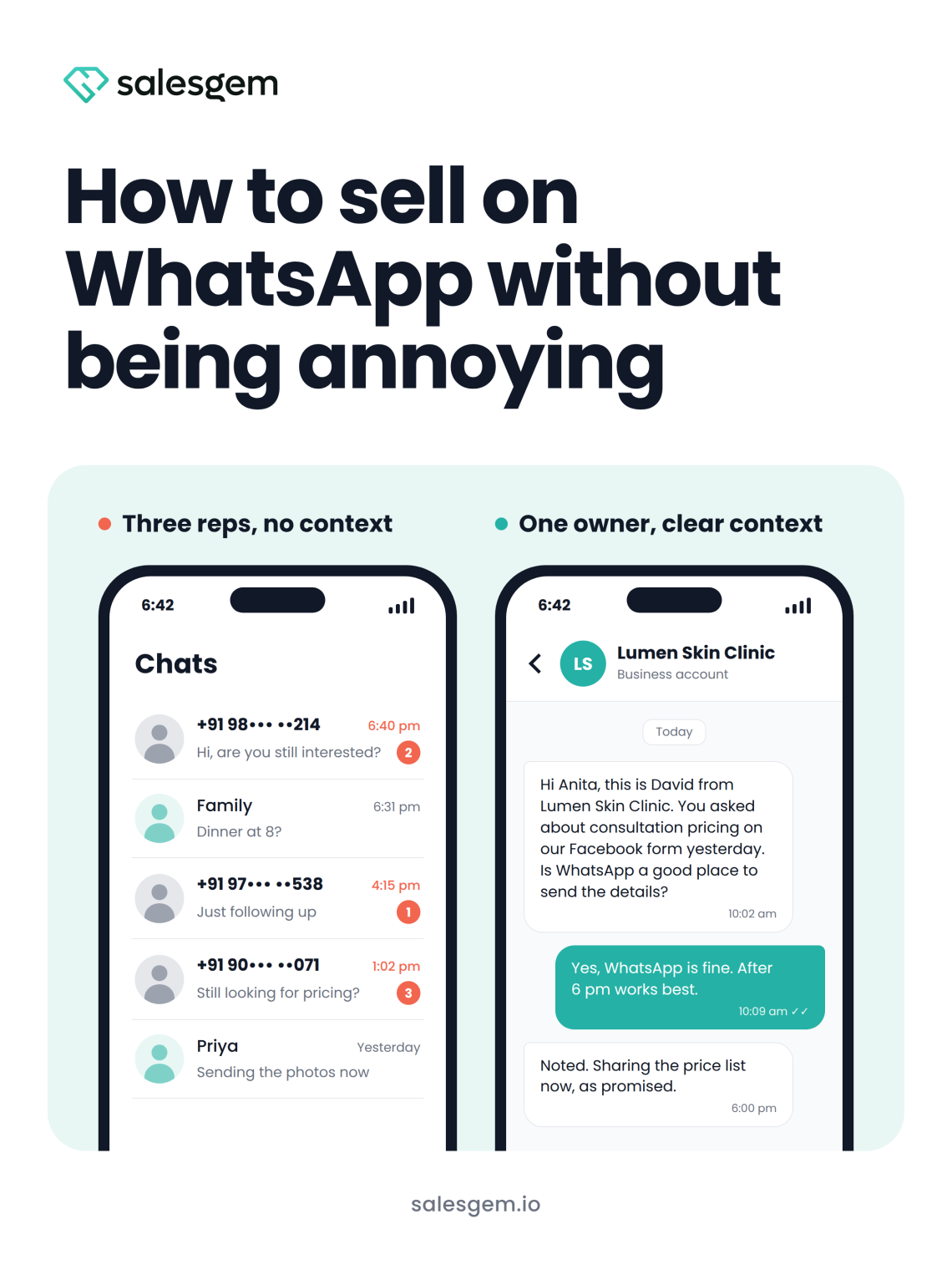
From our side, three people were simply trying to follow up. From hers, three different numbers were contacting her about the same inquiry.
Who owns the follow up?
Our manager’s first question was why the team was “over following” leads. On paper, it looked like three reps being too aggressive.
Each of us had done what the process allowed, though. Nobody knew who owned the lead, and nobody could see what had already been said. There was also no agreed point where follow up should stop.
A shared sheet can’t fix that. It shows a name and a status, and the status is only as current as the last person who updated it. It’s the same reason your sales rep’s phone shouldn’t be your CRM: the conversation stays with one person and vanishes for everyone else.
The fix starts before anyone types a word. Assign each lead to one rep automatically as soon as it arrives, and make the full conversation visible to the team.
The WhatsApp rules behind annoying follow up
Many reps I coach treat WhatsApp like a personal chat app with no rules. That changes once a business connects through the WhatsApp Business API, which is how a CRM for WhatsApp leads sends messages. Four rules matter most for follow up.
Permission comes first. WhatsApp’s Business Messaging Policy says a business can only contact people who have shared their number and agreed to hear from it. The same policy requires you to respect every request to stop.
Late messages need templates. When a lead messages you, a 24 hour customer service window opens, and your reps can reply normally inside it. Outside that window, or before the lead has written to you at all, you can only send a template Meta has approved. Meta’s pricing documentation explains how both work. A casual “just checking in” three days later isn’t an option, so every late follow up needs to be written in advance.
Negative feedback counts against you. Meta rates each template on customer feedback and engagement. A template that keeps collecting negative feedback can end up paused or disabled. One pushy sequence can take a template out of use for the whole team.
Marketing messages are capped per person. Meta also limits how many marketing templates one person can receive from all businesses combined. If a homeowner already got several promotions today, yours may never arrive.
What the October 2026 pricing change means for WhatsApp follow up
Normal replies inside the 24 hour window have been free on the API. Meta’s pricing update for October 1, 2026 makes those replies chargeable per message, at rates that vary by country. So every “any update?” message now costs money as well as goodwill.
One exception is worth planning around. Some leads message you from a Click to WhatsApp ad or a Facebook Page button. If you reply within 24 hours, a 72 hour free entry point window opens. Messages you send inside it are free. For those leads, put your most useful follow up inside those 72 hours.
A permission based rhythm for WhatsApp follow up
The rhythm I now set up with every team rests on one idea. Each message should earn permission for the next one.
Step 1: open with context the lead can place
Name your business and the exact inquiry. Mention where the lead found you, then ask one easy question. Here’s the kind of opener I write for a skin clinic:
Hi Anita, this is David from Lumen Skin Clinic. You asked about consultation pricing on our Facebook form yesterday. I tried calling just now. Is WhatsApp a good place to send you the details?
Before she has to ask “who is this?”, the message has already answered. It also asks permission to keep going on WhatsApp. If your team sends through the API, this opener will usually be a template, so build the context into the template itself.
Step 2: let the lead choose how to continue
Ask once whether WhatsApp or a call suits them better, and when. Then note the answer on the lead record, so the next person who opens it sees it. A lead who said “WhatsApp only, after 6 pm” should never get a lunchtime call from a second rep.
Step 3: make every follow up add something
Drop “just checking in.” Each message should either give the lead something useful or ask a question they can answer in one word.
Hi Anita, sharing the price list you asked for. The first visit is a consultation, so there’s nothing to commit to yet. Would a weekday or a weekend slot suit you better?
A message like that gives her a reason to reply. Asking “still interested?” gives her a reason to mute you.
Step 4: set a stopping rule and close the loop
Decide the stopping point before message one. Mine is three unanswered messages across roughly a week. After that, I send one closing message and park the lead with a dated reminder.
Hi Anita, I don’t want to keep filling up your chat, so I’ll pause here. Whenever you’d like to pick this up, reply to this message and I’ll take it from there.
Parked leads come back more often than reps expect. The pricing lead from my first story did, almost two weeks later. A clean closing message makes that return easy.
WhatsApp follow up frequency rules I give every team
I hand these rules to every team I work with.
- One lead, one owner. Nobody messages a lead they don’t own.
- Read the full conversation before sending anything.
- A blue tick means the message was opened. Read nothing more into it.
- Wait at least one working day after an unanswered message before sending another.
- Message within working hours unless the lead asked for a different time.
- Send voice notes or make WhatsApp calls only after the lead uses them or agrees to them.
- After three unanswered messages, send a closing message and park the lead.
- Stop the moment a lead says “not now” or “stop,” and log the date.
How WhatsApp follow up changes by industry
Those rules hold everywhere. Each industry still finds its own way to break them.
Aesthetic and healthcare clinics
Discretion matters more here than anywhere else. The first line of your message often shows on the lock screen, where a partner or colleague might see it. Write “your consultation inquiry” instead of naming a hair transplant or weight loss treatment.
Procedures like these are rarely a same week decision. Send something useful every week or two, and skip the “any update?” pings. Hold back before and after photos until the patient asks for them. Many people who miss a consultation feel embarrassed about it, so one friendly rescheduling message works better than a chase.
Route medical questions to the doctor, too. A coordinator guessing at outcomes in writing creates problems that screenshots keep alive.
Education and coaching
The student fills in the form, but a parent often pays. Ask early who is making the decision and whether a parent wants to join the conversation. With leads under 18, bring the parent in before you go further.
Watch fake urgency as well. “Only a few seats left” every week teaches leads to ignore you. Demo class reminders also pile up fast: confirmation, reminder, second reminder, replay link, then an offer. Cut that sequence down to what the student actually needs.
Solar installation
Homeowners often request quotes from several installers at once. So your first message may be the fourth one they read that day. Stand out with context, like the monthly bill or roof size they shared.
After the site visit and quote, the decision usually waits on a spouse or a loan approval. Sending “did you check the quote?” every two days won’t move either one. Ask what the decision depends on, then follow up on that. On the API, gaps this long mean your follow ups will be templates, so write them with that context built in.
Home services
Home service leads are usually urgent. When an AC stops working, the customer books whoever calls back first. That’s why how fast you respond to Facebook leads decides so many of these jobs. If they tell you they’ve booked someone else, stop there. Three more follow ups about a finished job just invite a block.
The other risk comes after the job. Review requests and maintenance plan offers tend to land together. Send them one at a time, with real gaps between them.
Car dealerships and insurance
Dealership leads often hear from two salespeople at the same showroom, plus other dealers of the same brand. Clear ownership matters even more there. Hold back loan and exchange offers until the buyer has picked a model.
Insurance leads bring a different problem. Scam messages pretending to be banks and insurers have made many people wary of unknown business numbers. A context first opener and a complete WhatsApp business profile do much of the trust building for you.
What I now tell every team about WhatsApp follow up
When a manager asks me whether their team follows up too much, I ask two questions back. Does the lead know who is messaging them? And does that person actually own the lead?
Fix ownership before you rewrite a single template. Good copy can’t save a team where three reps message the same person. Write every first message as if the lead has already forgotten you, because often they have. Put your stopping rule in writing, so it survives a busy week. And keep conversations visible to the team, never locked inside one rep’s phone.
If your team still works Facebook and WhatsApp leads from a shared sheet, that sheet is where annoying follow up starts. Salesgem was built for exactly that setup. It assigns each lead to one rep as it arrives. The team can see the conversation and follow up tasks in one place. Nobody sends the third “are you still interested?” by accident. You can Sign Up for Salesgem and see how your team’s follow up changes.
No credit card needed · 14 day free trial · Free support and migration
Frequently asked questions about WhatsApp follow up
How many times you should follow up on WhatsApp depends on whether the lead is responding. For leads who go quiet, my rule is three messages across roughly a week, each adding something new. After that, I send one closing message and park the lead with a dated reminder. A clear “not now” or “stop” ends the sequence immediately, whatever the count.
A business can’t message a lead on WhatsApp without permission under WhatsApp’s Business Messaging Policy. The person has to share their number and agree to hear from that business. The policy also requires businesses to respect every request to stop. If your leads come from a Facebook form, check that the form makes it clear your business will contact them.
The 24 hour rule on WhatsApp Business is the customer service window on the WhatsApp Business API. When a lead messages you, your team can reply normally for 24 hours. After that, you can only send an approved template until the lead writes again. Leads from Click to WhatsApp ads can also open a 72 hour window where messages are free.
Leads read WhatsApp messages without replying for ordinary reasons. Often they don’t recognize the number, or they’re comparing a few businesses and haven’t decided yet. A blue tick only tells you they opened the message. Before sending another message, check that your first one named your business and the exact inquiry the lead made.
Your first WhatsApp follow up message should name your business and the exact inquiry the lead made. Mention where they found you, such as a Facebook form, so they can place you straight away. Then ask one easy question, like whether WhatsApp or a call suits them better. Keep it short enough to make sense in the notification preview.